> ## Documentation Index
> Fetch the complete documentation index at: https://resend.com/docs/llms.txt
> Use this file to discover all available pages before exploring further.
# Custom Events
> Define custom events to trigger Automations.
Custom events are used to trigger automations and can be defined with an optional schema for payload validation.
If a schema is defined, payloads are validated when the event is sent. Fields that don't match the expected type are rejected with a `422` error and the event is not delivered.
## Using the dashboard
The [Events page](https://resend.com/automations/events) shows all existing events.
Click **Add event** to create a new event.
Enter the event name and optional schema to define the event payload you will send with the event.
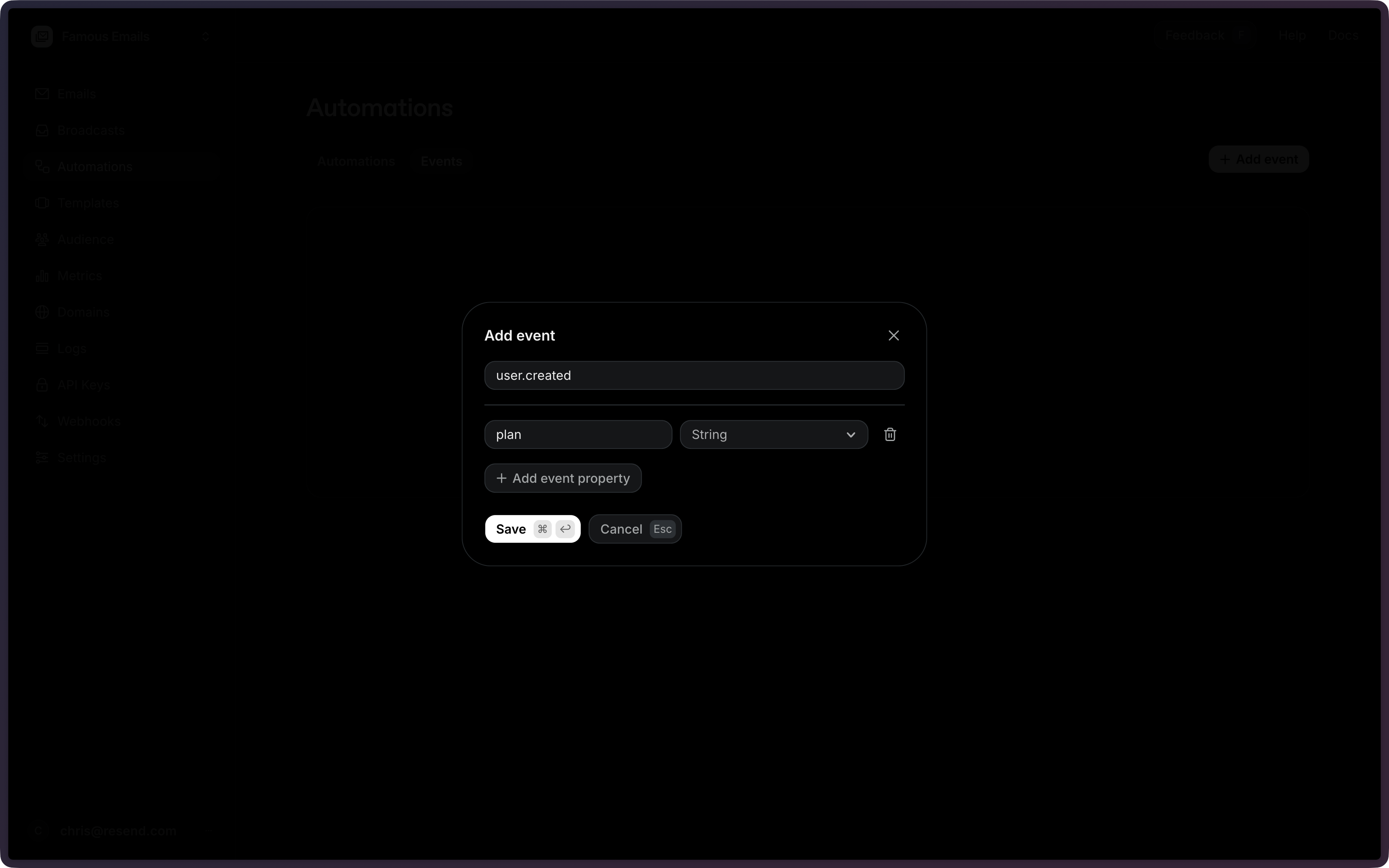 The event name can be any string (e.g., `user.created`, `welcome`,
`my-custom-event`). Dot notation is a recommended convention but is not
required. If multiple enabled automations use the same event name, all of them
will be triggered.
When you're done, **Save** the event.
## Using the API
All existing events can be retrieved using the [List Events API](/docs/api-reference/events/list-events).
To create a new event, use the [Create Event API](/docs/api-reference/events/create-event) and provide an event name and optional schema.
```ts Node.js theme={"theme":{"light":"github-light","dark":"vesper"}}
import { Resend } from 'resend';
const resend = new Resend('re_xxxxxxxxx');
const { data, error } = await resend.events.create({
name: 'user.created',
schema: {
plan: 'string',
},
});
```
```php PHP theme={"theme":{"light":"github-light","dark":"vesper"}}
$resend = Resend::client('re_xxxxxxxxx');
$resend->events->create([
'name' => 'user.created',
'schema' => ['plan' => 'string'],
]);
```
```python Python theme={"theme":{"light":"github-light","dark":"vesper"}}
import resend
resend.api_key = "re_xxxxxxxxx"
params: resend.Events.CreateParams = {
"name": "user.created",
"schema": {
"plan": "string",
},
}
resend.Events.create(params)
```
```ruby Ruby theme={"theme":{"light":"github-light","dark":"vesper"}}
require "resend"
Resend.api_key = "re_xxxxxxxxx"
params = {
name: "user.created",
schema: {
plan: "string",
},
}
Resend::Events.create(params)
```
```go Go theme={"theme":{"light":"github-light","dark":"vesper"}}
package main
import "github.com/resend/resend-go/v4"
func main() {
client := resend.NewClient("re_xxxxxxxxx")
params := &resend.CreateEventRequest{
Name: "user.created",
Schema: map[string]string{
"plan": resend.EventSchemaTypeString,
},
}
client.Events.Create(params)
}
```
```rust Rust theme={"theme":{"light":"github-light","dark":"vesper"}}
use resend_rs::{json, types::CreateEventOptions, Resend, Result};
#[tokio::main]
async fn main() -> Result<()> {
let resend = Resend::new("re_xxxxxxxxx");
let opts = CreateEventOptions {
name: "user.created".to_owned(),
schema: json!({
"plan": "string",
}),
};
let _event = resend.events.create(opts).await?;
Ok(())
}
```
```java Java theme={"theme":{"light":"github-light","dark":"vesper"}}
import com.resend.*;
import com.resend.core.exception.ResendException;
import com.resend.services.events.model.CreateEventOptions;
import com.resend.services.events.model.CreateEventResponseSuccess;
public class Main {
public static void main(String[] args) throws ResendException {
Resend resend = new Resend("re_xxxxxxxxx");
CreateEventOptions params = CreateEventOptions.builder()
.name("user.created")
.addSchema("plan", "string")
.build();
CreateEventResponseSuccess data = resend.events().create(params);
}
}
```
```csharp .NET theme={"theme":{"light":"github-light","dark":"vesper"}}
using Resend;
using System.Text.Json;
IResend resend = ResendClient.Create( "re_xxxxxxxxx" );
var schema = JsonSerializer.SerializeToElement( new { plan = "string" } );
var resp = await resend.EventCreateAsync( new EventCreateData()
{
Name = "user.created",
Schema = schema,
} );
Console.WriteLine( "EventId={0}", resp.Content );
```
```bash cURL theme={"theme":{"light":"github-light","dark":"vesper"}}
curl -X POST 'https://api.resend.com/events' \
-H 'Authorization: Bearer re_xxxxxxxxx' \
-H 'Content-Type: application/json' \
-d '{
"name": "user.created",
"schema": {
"plan": "string"
}
}'
```
```bash CLI theme={"theme":{"light":"github-light","dark":"vesper"}}
resend events create --name user.created --schema '{"plan":"string"}'
```
The event name can be any string (e.g., `user.created`, `welcome`,
`my-custom-event`). Dot notation is a recommended convention but is not
required. If multiple enabled automations use the same event name, all of
them will be triggered.
View the [Create Event API reference](/docs/api-reference/events/create-event) for the full endpoint specification.
## Configuration
The name of the custom event to create. Used to match events to automation triggers.
Event names cannot start with the `resend:` prefix, which is reserved for system events.
An optional schema definition for the event payload. Must be an object with
flat key/type pairs. Supported types: `string`, `number`, `boolean`, `date`.
```json Example theme={"theme":{"light":"github-light","dark":"vesper"}} theme={"theme":{"light":"github-light","dark":"vesper"}} theme={"theme":{"light":"github-light","dark":"vesper"}} theme={"theme":{"light":"github-light","dark":"vesper"}} theme={"theme":{"light":"github-light","dark":"vesper"}} theme={"theme":{"light":"github-light","dark":"vesper"}} theme={"theme":{"light":"github-light","dark":"vesper"}}
{
"schema": {
"plan": "string",
"amount": "number",
"date": "date",
"is_active": "boolean"
}
}
```
The event name can be any string (e.g., `user.created`, `welcome`,
`my-custom-event`). Dot notation is a recommended convention but is not
required. If multiple enabled automations use the same event name, all of them
will be triggered.
When you're done, **Save** the event.
## Using the API
All existing events can be retrieved using the [List Events API](/docs/api-reference/events/list-events).
To create a new event, use the [Create Event API](/docs/api-reference/events/create-event) and provide an event name and optional schema.
```ts Node.js theme={"theme":{"light":"github-light","dark":"vesper"}}
import { Resend } from 'resend';
const resend = new Resend('re_xxxxxxxxx');
const { data, error } = await resend.events.create({
name: 'user.created',
schema: {
plan: 'string',
},
});
```
```php PHP theme={"theme":{"light":"github-light","dark":"vesper"}}
$resend = Resend::client('re_xxxxxxxxx');
$resend->events->create([
'name' => 'user.created',
'schema' => ['plan' => 'string'],
]);
```
```python Python theme={"theme":{"light":"github-light","dark":"vesper"}}
import resend
resend.api_key = "re_xxxxxxxxx"
params: resend.Events.CreateParams = {
"name": "user.created",
"schema": {
"plan": "string",
},
}
resend.Events.create(params)
```
```ruby Ruby theme={"theme":{"light":"github-light","dark":"vesper"}}
require "resend"
Resend.api_key = "re_xxxxxxxxx"
params = {
name: "user.created",
schema: {
plan: "string",
},
}
Resend::Events.create(params)
```
```go Go theme={"theme":{"light":"github-light","dark":"vesper"}}
package main
import "github.com/resend/resend-go/v4"
func main() {
client := resend.NewClient("re_xxxxxxxxx")
params := &resend.CreateEventRequest{
Name: "user.created",
Schema: map[string]string{
"plan": resend.EventSchemaTypeString,
},
}
client.Events.Create(params)
}
```
```rust Rust theme={"theme":{"light":"github-light","dark":"vesper"}}
use resend_rs::{json, types::CreateEventOptions, Resend, Result};
#[tokio::main]
async fn main() -> Result<()> {
let resend = Resend::new("re_xxxxxxxxx");
let opts = CreateEventOptions {
name: "user.created".to_owned(),
schema: json!({
"plan": "string",
}),
};
let _event = resend.events.create(opts).await?;
Ok(())
}
```
```java Java theme={"theme":{"light":"github-light","dark":"vesper"}}
import com.resend.*;
import com.resend.core.exception.ResendException;
import com.resend.services.events.model.CreateEventOptions;
import com.resend.services.events.model.CreateEventResponseSuccess;
public class Main {
public static void main(String[] args) throws ResendException {
Resend resend = new Resend("re_xxxxxxxxx");
CreateEventOptions params = CreateEventOptions.builder()
.name("user.created")
.addSchema("plan", "string")
.build();
CreateEventResponseSuccess data = resend.events().create(params);
}
}
```
```csharp .NET theme={"theme":{"light":"github-light","dark":"vesper"}}
using Resend;
using System.Text.Json;
IResend resend = ResendClient.Create( "re_xxxxxxxxx" );
var schema = JsonSerializer.SerializeToElement( new { plan = "string" } );
var resp = await resend.EventCreateAsync( new EventCreateData()
{
Name = "user.created",
Schema = schema,
} );
Console.WriteLine( "EventId={0}", resp.Content );
```
```bash cURL theme={"theme":{"light":"github-light","dark":"vesper"}}
curl -X POST 'https://api.resend.com/events' \
-H 'Authorization: Bearer re_xxxxxxxxx' \
-H 'Content-Type: application/json' \
-d '{
"name": "user.created",
"schema": {
"plan": "string"
}
}'
```
```bash CLI theme={"theme":{"light":"github-light","dark":"vesper"}}
resend events create --name user.created --schema '{"plan":"string"}'
```
The event name can be any string (e.g., `user.created`, `welcome`,
`my-custom-event`). Dot notation is a recommended convention but is not
required. If multiple enabled automations use the same event name, all of
them will be triggered.
View the [Create Event API reference](/docs/api-reference/events/create-event) for the full endpoint specification.
## Configuration
The name of the custom event to create. Used to match events to automation triggers.
Event names cannot start with the `resend:` prefix, which is reserved for system events.
An optional schema definition for the event payload. Must be an object with
flat key/type pairs. Supported types: `string`, `number`, `boolean`, `date`.
```json Example theme={"theme":{"light":"github-light","dark":"vesper"}} theme={"theme":{"light":"github-light","dark":"vesper"}} theme={"theme":{"light":"github-light","dark":"vesper"}} theme={"theme":{"light":"github-light","dark":"vesper"}} theme={"theme":{"light":"github-light","dark":"vesper"}} theme={"theme":{"light":"github-light","dark":"vesper"}} theme={"theme":{"light":"github-light","dark":"vesper"}}
{
"schema": {
"plan": "string",
"amount": "number",
"date": "date",
"is_active": "boolean"
}
}
```